업무 중 지도 검색 기능을 GUI로 구현하는 일이 있었고, 이를 위해 카카오 API를 사용하였다. 물론 실제 업무에서는 전자정부프레임워크(eGovFrame) 환경이었지만, API 호출 구조는 동일하기 때문에 Spring Boot 환경에서 동일 방식으로 테스트를 진행하였다. API 호출 방식은 GET 방식과 POST 방식 모두 구현하였으며, 각각 Postman을 통해 테스트 및 응답 결과를 확인하였다.
추가적으로, 전자정부프레임워크(eGovFrame) 환경에서는 아래의 로직을 RestTemplate만 추가해 그대로 활용 가능하다.
✅ 1. Kakao API URL 및 Key 설정
📌 1-1. application.properties
- 주의: Key는 반드시 "KakaoAK {REST_API_KEY}" 형태로 작성되어야 한다.
spring.application.name=KakaoAPI
kakao.api.url=https://dapi.kakao.com/v2/local/search
kakao.api.key=KakaoAK <내 Key값>
📌 1-2. Controller에서 값 주입
// application.properties에 정의된 kakao API URL을 주입받음
@Value("${kakao.api.url}")
private String kakaoApiUrl;

// application.properties에 정의된 kakao API 인증 키를 주입받음
@Value("${kakao.api.key}")
private String kakaoApiKey;
✅ 2. GET 방식 API 호출
📌 2-1. Controller 코드
/**
 * GET 방식: 카카오 외부 API 호출
 * 클라이언트로부터 요청 파라미터를 URL 쿼리로 전달받음
 * Kakao API에 GET 방식으로 전달하여 결과 반환
 * Postman 등에서는 직접 쿼리 스트링을 URL에 붙여 테스트 가능
 */
@RequestMapping(value = "/api/test/call.do", produces = "application/json; charset=UTF-8")
@ResponseBody
public ResponseEntity<String> callExternalApi(
        @RequestParam String type,
        @RequestParam String query,
        @RequestParam(required = false, defaultValue = "1") String page,
        @RequestParam(required = false, defaultValue = "10") String size) throws Exception {

    // 외부 API 요청을 위한 객체 생성
    RestTemplate restTemplate = new RestTemplate();

    // 전체 요청 URL 구성
    String fullUrl = kakaoApiUrl + "/" + type + "?page=" + page + "&size=" + size + "&query=" + query;

    // 인증용 헤더 설정
    HttpHeaders headers = new HttpHeaders();
    headers.set("Authorization", kakaoApiKey);

    // 헤더만 포함된 요청 Entity 생성 (GET 방식은 Body가 필요 없음)
    HttpEntity<Void> entity = new HttpEntity<>(headers);

    // 외부 API 호출 (GET 방식)
    ResponseEntity<String> response = restTemplate.exchange(fullUrl, HttpMethod.GET, entity, String.class);

    log.info("GET result = {}", response.getBody());
    return ResponseEntity.ok(response.getBody());
}
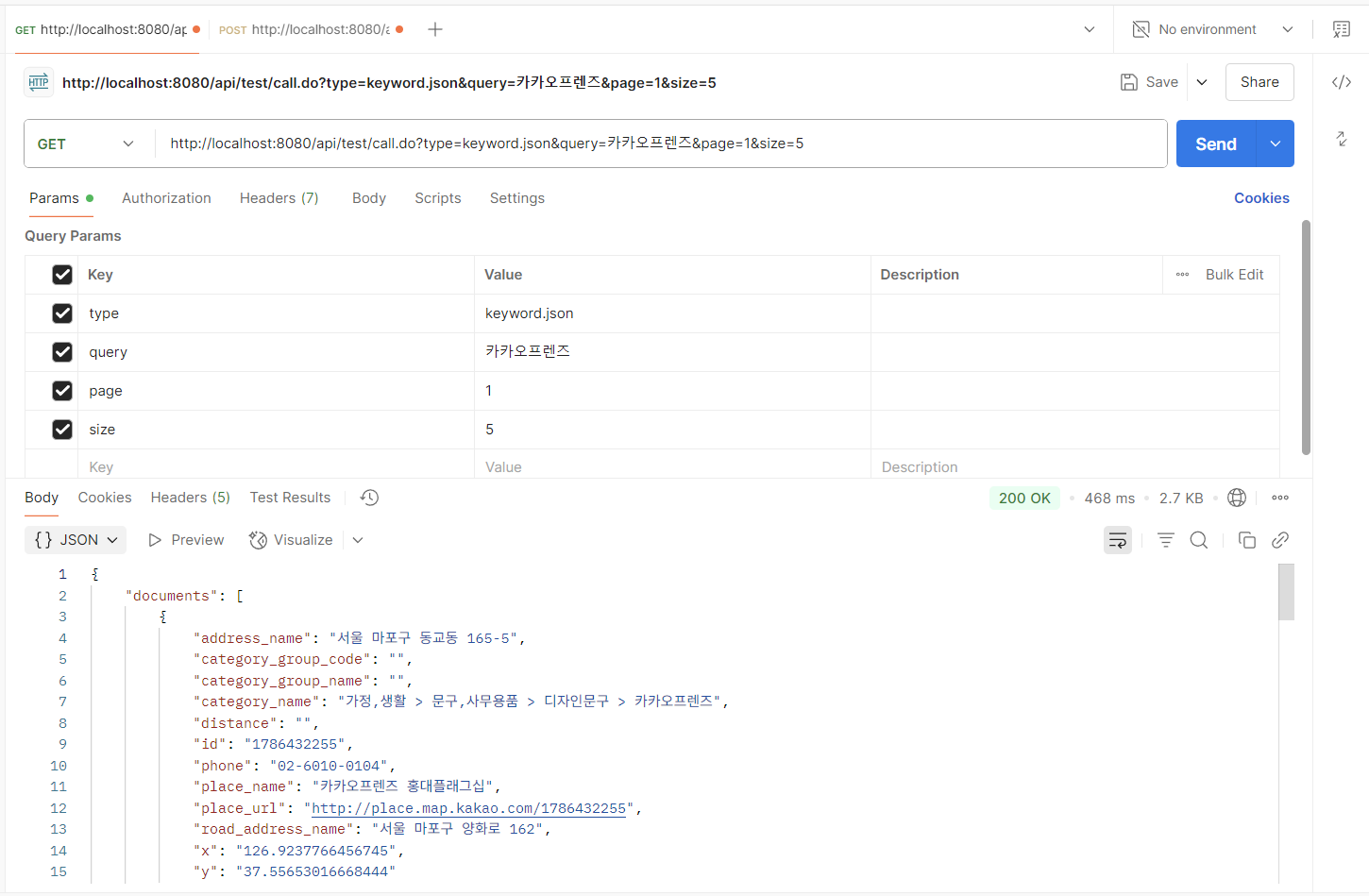
🚀 2-2. Postman GET 호출 방법
- URL : http://localhost:8080/api/test/call.do?type=keyword.json&query=카카오프렌즈&page=1&size=5
- Method : GET
- Headers : 별도 설정 없음
- Body : 없음
✅ 3. 📮 POST 방식 API 호출
📌 3-1. Controller 코드
/**
 * POST 방식: 카카오 외부 API 호출
 * JSON 형식으로 클라이언트가 요청 본문을 전송
 * 서버는 @RequestBody를 통해 Map으로 파라미터를 받음
 * POST 방식으로 외부 API에 전달
 */
@PostMapping(value = "/api/test/callpost.do", produces = "text/html; charset=UTF-8")
public ResponseEntity<String> callExternalApiPost(@RequestBody Map<String, Object> paramMap) throws Exception {

    // 외부 API 요청을 위한 객체 생성
    RestTemplate restTemplate = new RestTemplate();

    // 클라이언트가 보낸 JSON 본문에서 값 추출
    String type = (String) paramMap.get("type");
    String query = (String) paramMap.get("query");
    String page = String.valueOf(paramMap.get("page"));
    String size = String.valueOf(paramMap.get("size"));

    // 전체 요청 URL 구성
    String fullUrl = kakaoApiUrl + "/" + type + "?page=" + page + "&size=" + size + "&query=" + query;

    // 인증 및 Content-Type 설정
    HttpHeaders headers = new HttpHeaders();
    headers.set("Authorization", kakaoApiKey);
    headers.setContentType(MediaType.APPLICATION_JSON);

    // 헤더 + 바디가 포함된 HttpEntity 생성
    HttpEntity<Map<String, Object>> entity = new HttpEntity<>(paramMap, headers);

    // 외부 API 호출 (POST 방식)
    ResponseEntity<String> response = restTemplate.exchange(fullUrl, HttpMethod.POST, entity, String.class);

    log.info("POST result = {}", response.getBody());
    return ResponseEntity.ok(response.getBody());
}
🚀 3-2. Postman POST 호출 방법
- URL : http://localhost:8080/api/test/callpost.do
- Method : POST
- Headers
- Key : Content-Type
- Value : application/json
- Body → raw + JSON 형식
{
  "type": "keyword.json",
  "query": "카카오프렌즈",
  "page": 1,
  "size": 5
}

📄 Controller.java 코드
package com.example.kakaoapi.controller;

import lombok.extern.slf4j.Slf4j;
import org.springframework.beans.factory.annotation.Value;
import org.springframework.http.*;
import org.springframework.web.bind.annotation.*;
import org.springframework.web.client.RestTemplate;
import java.util.Map;

@Slf4j
@RestController
public class KakaoApiController {

    // application.properties에 정의된 kakao API URL을 주입받음
    @Value("${kakao.api.url}")
    private String kakaoApiUrl;

    // application.properties에 정의된 kakao API 인증 키를 주입받음
    @Value("${kakao.api.key}")
    private String kakaoApiKey;

    /**
     * GET 방식: 카카오 외부 API 호출
     * 클라이언트로부터 요청 파라미터를 URL 쿼리로 전달받음
     * Kakao API에 GET 방식으로 전달하여 결과 반환
     * Postman 등에서는 직접 쿼리 스트링을 URL에 붙여 테스트 가능
     */
    @RequestMapping(value = "/api/test/call.do", produces = "application/json; charset=UTF-8")
    @ResponseBody
    public ResponseEntity<String> callExternalApi(
            @RequestParam String type,
            @RequestParam String query,
            @RequestParam(required = false, defaultValue = "1") String page,
            @RequestParam(required = false, defaultValue = "10") String size) throws Exception {

        // 외부 API 요청을 위한 객체 생성
        RestTemplate restTemplate = new RestTemplate();

        // 전체 요청 URL 구성
        String fullUrl = kakaoApiUrl + "/" + type + "?page=" + page + "&size=" + size + "&query=" + query;

        // 인증용 헤더 설정
        HttpHeaders headers = new HttpHeaders();
        headers.set("Authorization", kakaoApiKey);

        // 헤더만 포함된 요청 Entity 생성 (GET 방식은 Body가 필요 없음)
        HttpEntity<Void> entity = new HttpEntity<>(headers);

        // 외부 API 호출 (GET 방식)
        ResponseEntity<String> response = restTemplate.exchange(fullUrl, HttpMethod.GET, entity, String.class);

        log.info("GET result = {}", response.getBody());
        return ResponseEntity.ok(response.getBody());
    }

    /**
     * POST 방식: 카카오 외부 API 호출
     * JSON 형식으로 클라이언트가 요청 본문을 전송
     * 서버는 @RequestBody를 통해 Map으로 파라미터를 받음
     * POST 방식으로 외부 API에 전달
     */
    @PostMapping(value = "/api/test/callpost.do", produces = "text/html; charset=UTF-8")
    public ResponseEntity<String> callExternalApiPost(@RequestBody Map<String, Object> paramMap) throws Exception {

        // 외부 API 요청을 위한 객체 생성
        RestTemplate restTemplate = new RestTemplate();

        // 클라이언트가 보낸 JSON 본문에서 값 추출
        String type = (String) paramMap.get("type");
        String query = (String) paramMap.get("query");
        String page = String.valueOf(paramMap.get("page"));
        String size = String.valueOf(paramMap.get("size"));

        // 전체 요청 URL 구성
        String fullUrl = kakaoApiUrl + "/" + type + "?page=" + page + "&size=" + size + "&query=" + query;

        // 인증 및 Content-Type 설정
        HttpHeaders headers = new HttpHeaders();
        headers.set("Authorization", kakaoApiKey);
        headers.setContentType(MediaType.APPLICATION_JSON);

        // 헤더 + 바디가 포함된 HttpEntity 생성
        HttpEntity<Map<String, Object>> entity = new HttpEntity<>(paramMap, headers);

        // 외부 API 호출 (POST 방식)
        ResponseEntity<String> response = restTemplate.exchange(fullUrl, HttpMethod.POST, entity, String.class);

        log.info("POST result = {}", response.getBody());
        return ResponseEntity.ok(response.getBody());
    }
}'개발' 카테고리의 다른 글
| [Spring/Web] 400 에러, GET vs POST (0) | 2025.08.12 |
|---|---|
| [Maven] Maven, clean install, clean package 이란 (0) | 2025.08.05 |
| [DB SQL] JOIN · WITH 절을 활용한 쿼리 최적화 (0) | 2025.07.31 |
| [DB] 인덱스를 활용한 DB 쿼리 성능 개선 (1) | 2025.07.30 |
| [DBeaver] 행(라인) 번호 표시 (0) | 2025.06.18 |